By JayNovember 2026
When Your Customer Sends an AI Agent to Your Site
A customer asks their AI assistant to compare three local plumbers and book the cheapest one this week. The assistant visits your site, reads your prices and your booking page, and reports back. Your customer never opens a browser tab.
On November 4, 2026, Cloudflare published See the agents, set the terms, which adds controls for exactly this visit. Our earlier posts, including our guide to making a site visible to AI, covered whether AI can find your site. This one covers whether the assistant a customer sends is let in.
What Cloudflare added
Cloudflare's changelog entry renames its AI bot setting to AI Crawler and Agent access policies (Security, then Settings). Three pieces are worth knowing:
- A policy for each personal agent. The existing Agents policy still sets the default. Each supported personal agent can now be set on its own to Allow, Block on pages with ads or Block.
- Reports on personal agents. Cloudflare's post describes a Personal Assistants category in its bot reports and a widget in its Top statistics view that lists which agents visit and what they request.
- Account-level visibility (early access). Account Abuse Protection (Cloudflare's tool for detecting account fraud, in early access for Bot Management Enterprise customers) can show which agent acted for which user account, aimed at sites that run logins.
What our own settings show
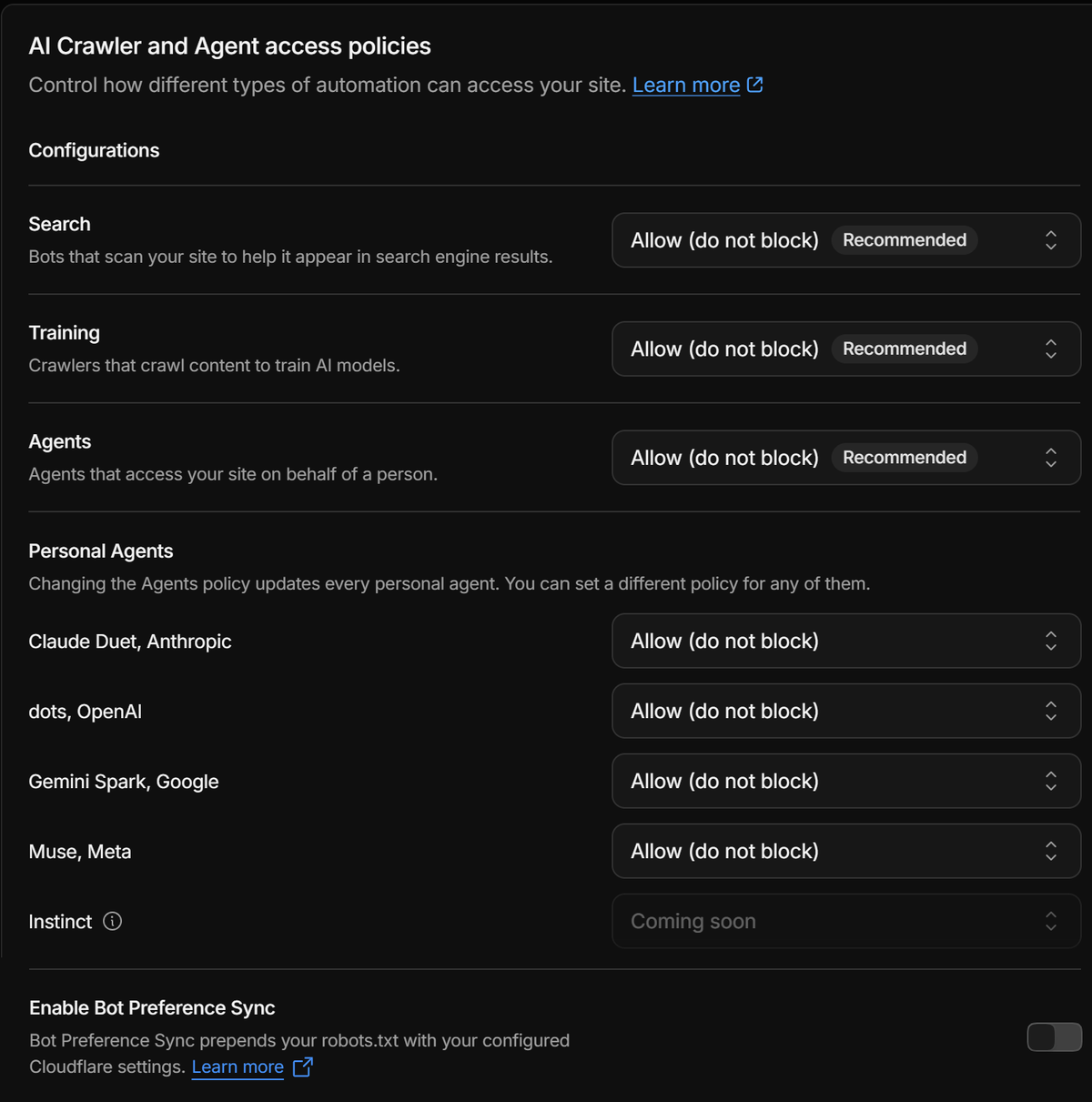
We opened the panel for addai.dev, which runs on Cloudflare's Free plan. Search, Training and Agents are all set to Allow (do not block). Under Personal Agents the panel lists four agents we can set individually, all on Allow:
- Claude Duet (Anthropic)
- dots (OpenAI)
- Gemini Spark (Google)
- Muse (Meta)
A fifth agent (Instinct) shows as “Coming soon” and cannot be set yet. Cloudflare's documentation says personal agents inherit the Agents policy, so changing that one setting changes all four (unless you have set one individually), and it recommends Allow for them.
Setting terms and seeing visits are two features
We did not find the Personal Assistants widget on addai.dev. The Top statistics view (checked November 5, 2026) shows ten widgets, and none is that one. Cloudflare's Security Analytics documentation does not mention it, and its Bot Analytics page ties its views to Business and Enterprise plans. Cloudflare has not said which plans receive the new widget, and it lists the agents that visit, so it may also depend on a personal agent having visited.
So on a Free plan you can set terms for a named agent today. Seeing which agents actually visit may need a different plan, a later rollout or some matching traffic. Check your own dashboard before you plan around it.
Where the control lives
Cloudflare's documentation says robots.txt directives are voluntary, so a crawler can ignore them. The access policies are different: Cloudflare applies Block to matching requests itself, so a crawler cannot simply ignore it (it does depend on Cloudflare recognizing the agent). Our robots.txt still carries a Content-Signal line (a declaration for now, not an enforced rule) that says search=yes, ai-input=yes, ai-train=yes. Our Cloudflare settings say the same thing, so the two agree.
If your file says welcome and Cloudflare says no, Cloudflare wins.
Cloudflare also counts chat fetch bots as Agents, so the user-triggered bots our guide covers (such as ChatGPT-User and Claude-User) sit under the same policy. The personal agents above are the named, per-agent layer on top of it.
One more setting on that screen deserves a look before you touch it. Bot Preference Sync adds your configured Cloudflare settings to the top of your robots.txt. It is off for addai.dev, and we keep it off because we maintain that file by hand.
What we do with this
Defaults depend on how a domain was set up. Since September 15, a new domain is offered one of two presets. With ad revenue, Training is Disallow AI Training and Agent is Block on pages with ads. Without ads, all three are Allow (Cloudflare). Check yours rather than assume it:
- Keep Agents on Allow when customers' assistants should reach your prices, hours and booking page. Because personal agents inherit it, a Block here applies to all of them until you override one.
- Override one agent only for a reason you can name, and write the reason down.
- Avoid a plain Block on Training if you want search traffic, because it also blocks Googlebot, Bingbot and Applebot.
- Check that your robots.txt and your Cloudflare settings say the same thing.
- Re-read your settings after any change (and after Cloudflare adds an agent such as Instinct), because these defaults and lists have changed since July 1.
If your site is not on Cloudflare, the same question applies on any host: which assistants can reach your prices and your booking page? addAI.dev checks where your site stands, whichever host it runs on, and sets up the agent settings, the robots.txt that matches them and the checks that confirm both say the same thing.
Sources
- See the agents, set the terms (Cloudflare blog, 2026-11-04)
- Granular access controls for the top Personal Agents (Cloudflare changelog)
- AI Crawler and Agent access policies (Cloudflare docs)
- Security Analytics (Cloudflare docs)
- Bot Analytics (Cloudflare docs)
- Accountable mixed-use AI crawlers (Cloudflare blog)
- New options to manage AI traffic (Cloudflare changelog, 2026-07-01)
- Account Abuse Protection (Cloudflare docs)
- Our own Cloudflare dashboard (Free plan), checked 2026-11-05